Electronic Visit Verification
Every visit, recorded and verified.
EVV is how Medicaid-funded home care visits are recorded in Pennsylvania. Our caregivers clock in and out with HHAeXchange. This page explains how to record each visit and how to complete and submit the weekly EVV timesheet.
On this page
EVV in five parts.
- Fillable PDF, or print and fill by hand
- Sunday to Saturday, due at the end of the week
- Signed by caregiver and participant
What is EVV?
A clear record of every care visit.
Electronic Visit Verification (EVV) is an electronic record confirming that each home care visit took place as planned. The federal 21st Century Cures Act requires EVV for Medicaid-funded personal care and home health services, and Pennsylvania’s Department of Human Services (DHS) requires it for the services we provide.
EVV protects everyone involved. Participants can be sure the care they are authorized for is delivered, and caregivers are paid accurately for the time they work.
Every visit records six things
1
2
3
4
5
6
Person receiving the service
Date of the service
Location of the service
Caregiver providing the service
Time the service starts and ends
For caregivers
Three ways to record a visit.
We use HHAeXchange for EVV. Clock in when the visit starts and clock out when it ends, using the first method that’s available to you.
Preferred
1. HHAeXchange app
Clock in on the HHAeXchange mobile app when you arrive and clock out before you leave. The app confirms where the visit takes place, so always clock in and out at the participant’s home.
2. Phone
If you can’t use the app, call the HHAeXchange phone line from the participant’s home phone to clock in and out. Only use a phone number we have on file for that participant.
3. Manual entry
Only when neither HHAeXchange method works. Call the office the same day, record the visit on your weekly timesheet with an exception note, and have it signed. The office must approve every manual entry.
Your HHAeXchange login and the phone line number are given to you by our office. Don’t have them yet? Call us and we’ll set you up.
+1 (412) 779-3369- Clock in and out on time. Clock in when the visit starts and out when it ends. Never clock in early, clock out late or record time you did not work.
- Record visits at the right address. Clock in and out only at the service address in the participant’s service plan.
- Follow the service plan. Provide only the services authorized for the participant, at the scheduled times. Agree any schedule change with the office before the visit.
- Record the care you gave. Note the services completed at each visit. If the participant declines a task, write it in Services / notes.
- Report missed punches the same day. Call the office, then record the visit on your timesheet with an exception note explaining what happened.
- Get timesheets signed properly. Never ask a participant to sign a blank or incomplete timesheet, and never sign on their behalf.
Visit records that don’t match the care actually given cannot be billed to Medicaid and may be treated as fraud. If you are ever unsure what to record, ask the office first.
Weekly EVV timesheet
One timesheet, every week.
The weekly timesheet is the signed record that confirms your EVV entries. One sheet covers one participant for one week, Sunday to Saturday.
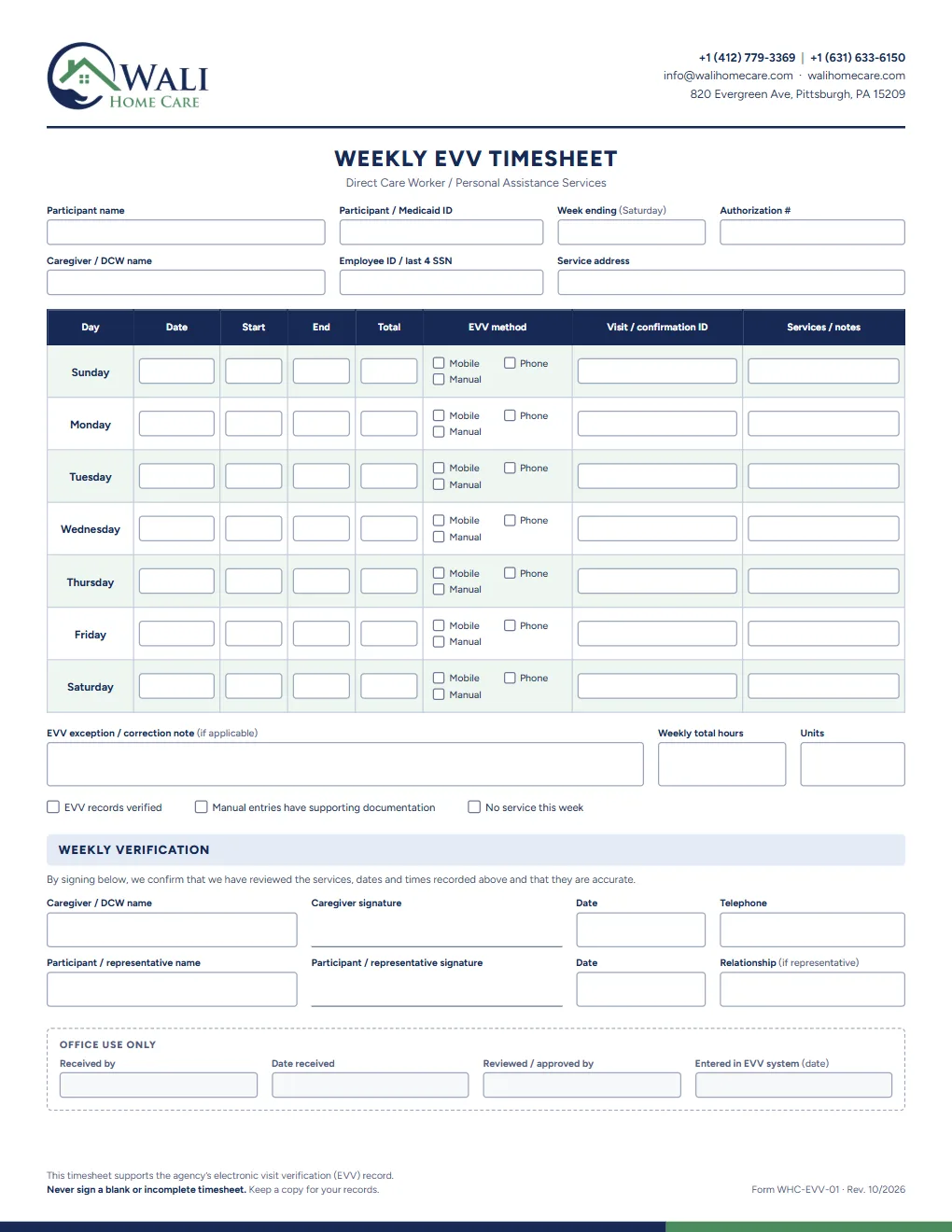
- 1Fill in the detailsParticipant name and Medicaid ID, the week ending date (the Saturday), the authorization number, your name and employee ID, and the service address.
- 2Record each dayFor every visit, enter the date, start and end time and total time, tick how it was recorded (mobile, phone or manual) and add the visit or confirmation ID. Leave days without a visit blank.
- 3Explain any exceptionsUse the exception note for any missed punch or manual entry. Add the weekly total hours and units, then tick the boxes that apply.
- 4Review and sign togetherCheck the week with the participant or their representative. You both print your names, sign and date the weekly verification.
Submitting your timesheet
Timesheets are due at the end of each week. Email the completed and signed timesheet to the office as a PDF or a clear photo, or hand it in at our office. Keep a copy for your own records.
Timesheets contain personal and Medicaid information. Send them only to the Wali Home Care office, never through group chats or social media.
Filling it in on a phone or computer: open the PDF, tap or click a box to type, then save and send it. On paper: print it on US Letter and complete it in blue or black ink.
For participants and families
What EVV means for you.
EVV helps make sure you receive the care you are authorized for, at the times you expect.
Check before you sign
Look over the dates and times on the weekly timesheet. Only sign when they match the care you received.
Never sign a blank form
You should never be asked to sign a blank or partly completed timesheet. If this happens, please tell us.
Your home phone
If your caregiver records visits by phone, they may ask to make a short call from your home phone to clock in and out.
Something not right?
If a visit time looks wrong, a visit was missed or you’re unsure about anything you’re asked to sign, call us.
Common questions
EVV questions, answered.
What if the HHAeXchange app isn’t working?
Use the phone method instead. If neither works, call the office, then record the visit on your weekly timesheet as a manual entry with an exception note.
Do I need a timesheet if I use the app?
Yes, unless the office tells you otherwise. The weekly timesheet is signed by you and the participant, and confirms your EVV entries for the week.
Which dates does one timesheet cover?
One week, Sunday to Saturday, for one participant. Write the Saturday’s date as the “Week ending” date, and hand the timesheet in at the end of that week. If you care for more than one participant, complete a separate timesheet for each.
Who do I contact with EVV questions?
Our office team. Call +1 (412) 779-3369 or email info@walihomecare.com for help with HHAeXchange logins, missed punches or timesheets.
Questions about EVV or your timesheet?
Our office team can help with HHAeXchange logins, missed punches and weekly timesheets.